> ## Documentation Index
> Fetch the complete documentation index at: https://docs.crun.ai/llms.txt
> Use this file to discover all available pages before exploring further.
# AI 图片增强 API
> 高分辨率图片放大与增强。
## 概述
`image-upscale` 是一个 AI 图片增强接口,用于在放大图片的同时提升细节质量。\
它支持基于提示词的增强、手部修复、可选的遮罩控制以及输出格式选择。
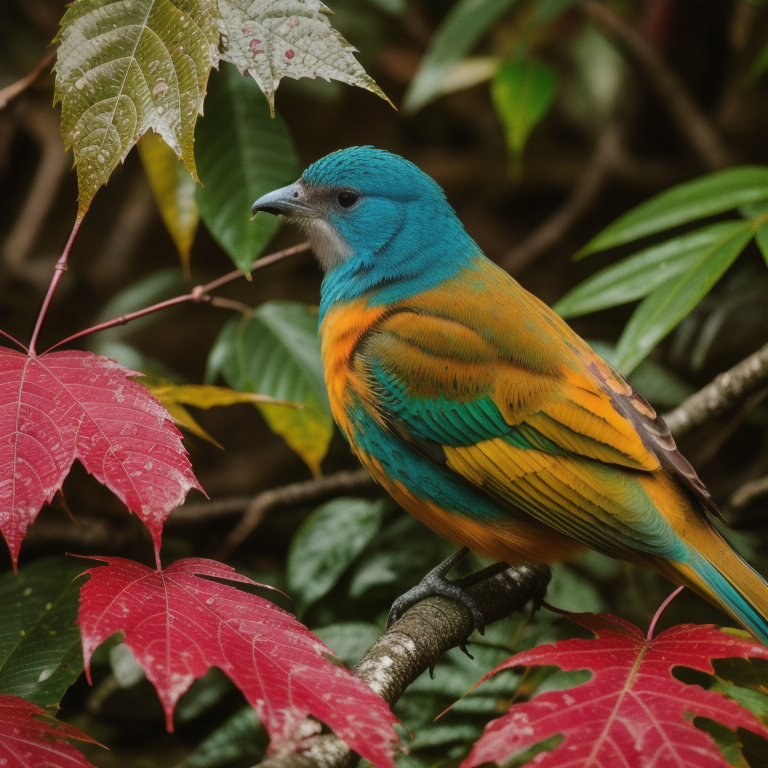
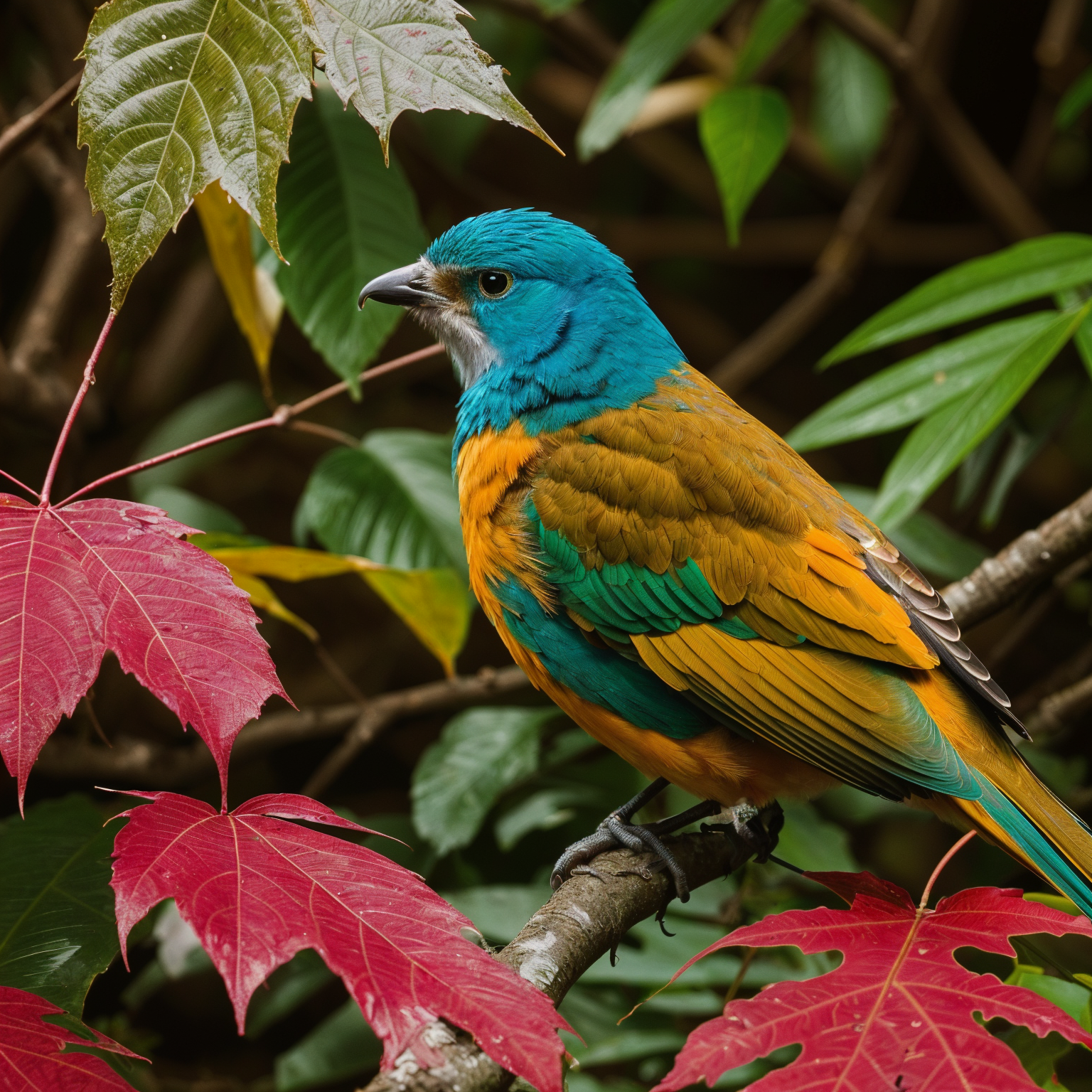
## 前后对比示例
**处理前(输入):**
**处理后(增强输出):**
## 参数说明
* `scale_factor`:输出缩放倍数。数值越大,生成的图片越大,通常耗时也越长。
* `dynamic`:HDR/细节强度。数值越高,局部对比度和纹理强调越明显。
* `creativity`:模型在原图基础上“创造”额外细节的程度。
* `resemblance`:输出结果应与原图保持一致的程度。
* `num_inference_steps`:采样步数。更多步数可能提升细节质量,但会增加运行时间。
* `handfix`:手部修复模式(`disabled`、`hands_only`、`image_and_hands`)。
* `pattern`:启用无缝图案模式,用于可平铺纹理。
* `output_format`:输出图片格式(`png`、`jpg`、`webp`)。
## 使用示例
```json theme={null}
{
"model": "image-upscale",
"callback_url": "https://your-domain.com/api/callback",
"input": {
"img_urls": [
"https://example.com/input.jpg"
],
"prompt": "masterpiece, best quality, ultra detailed, realistic, sharp focus",
"negative_prompt": "worst quality, low quality, blurry, noisy, artifacts",
"scale_factor": 2,
"dynamic": 6,
"creativity": 0.3,
"resemblance": 0.8,
"num_inference_steps": 18,
"handfix": "disabled",
"output_format": "png"
}
}
```
## 查询任务状态
提交任务后,使用统一查询接口检查进度并获取结果:
了解如何查询任务状态并获取生成结果
在生产环境中,我们建议使用 `callback_url` 参数在生成完成时接收自动通知,而不是轮询状态接口。
## 相关资源
浏览所有可用模型
查看账户剩余积分
## OpenAPI
````yaml zh/ai-tools/image-upscale.json post /api/v1/client/job/CreateTask
openapi: 3.0.0
info:
title: Crun 图片放大 API
description: crun.ai 图片放大 API 文档
version: 1.0.0
contact:
name: 技术支持
email: support@crun.ai
servers:
- url: https://api.crun.ai
description: API 服务器
security:
- ApiKeyAuth: []
paths:
/api/v1/client/job/CreateTask:
post:
summary: 图片放大和增强
operationId: image-upscale
requestBody:
required: true
content:
application/json:
schema:
type: object
required:
- model
- input
properties:
model:
type: string
enum:
- image-upscale
description: 此接口使用的模型名称。必须为 `image-upscale`。
callback_url:
type: string
format: uri
description: 可选。用于接收任务完成通知的回调 URL。
example: https://your-domain.com/api/callback
input:
$ref: '#/components/schemas/ImageUpscaleInput'
example:
model: image-upscale
callback_url: https://your-domain.com/api/callback
input:
img_urls:
- https://example.com/input.jpg
prompt: masterpiece, best quality, ultra detailed, realistic
negative_prompt: worst quality, low quality, blurry, artifacts
scale_factor: 2
dynamic: 6
creativity: 0.3
resemblance: 0.8
num_inference_steps: 18
handfix: disabled
output_format: png
responses:
'200':
description: 请求成功
content:
application/json:
schema:
allOf:
- $ref: '#/components/schemas/ApiResponse'
- type: object
properties:
data:
type: object
properties:
task_id:
type: string
description: 任务 ID,可与获取任务详情接口配合使用以查询任务状态
example: task_12345678
example:
code: 200
message: success
data:
task_id: task_12345678
'422':
description: 验证错误
content:
application/json:
schema:
allOf:
- $ref: '#/components/schemas/ApiResponse'
- type: object
properties:
errors:
type: array
description: 详细的验证错误消息
items:
type: string
example:
- 具体错误字段信息
example:
code: 422
message: 缺少参数或类型错误
errors:
- 具体错误字段信息
'500':
$ref: '#/components/responses/Error'
components:
schemas:
ImageUpscaleInput:
type: object
description: 用于图片放大和增强的输入参数。
properties:
img_urls:
type: array
description: 输入图片 URL。目前仅支持一张图片。
items:
type: string
format: uri
example: https://example.com/input.jpg
minItems: 1
maxItems: 1
prompt:
type: string
description: 可选的正向提示词,用于引导增强效果。如果省略,则使用系统默认提示词。
example: masterpiece, best quality, ultra detailed, realistic
negative_prompt:
type: string
description: 可选的负向提示词,用于抑制不需要的伪影或瑕疵。如果省略,则使用系统默认负向提示词。
example: worst quality, low quality, blurry, artifacts
scale_factor:
type: number
description: 放大倍率。
default: 2
maximum: 10
example: 2
dynamic:
type: number
description: HDR/细节强度。建议范围通常为 3-9。
default: 6
minimum: 1
maximum: 50
example: 6
creativity:
type: number
description: 创意强度。数值越高,结果可能与源图片偏离越多。
default: 0.35
minimum: 0
maximum: 1
example: 0.3
resemblance:
type: number
description: 与源图片的相似度/保真度。数值越高,通常越能保留源图片外观。
default: 0.6
minimum: 0
maximum: 3
example: 0.8
sharpen:
type: number
description: 可选的后处理锐化强度。`0` 表示不进行锐化。
minimum: 0
maximum: 10
example: 0
num_inference_steps:
type: integer
description: 增强处理的采样步数。
default: 18
minimum: 1
maximum: 100
example: 18
mask:
type: string
description: 可选的遮罩图片 URL/字符串,用于区域控制。
example: https://example.com/mask.png
handfix:
type: string
description: 手部修复模式。
enum:
- disabled
- hands_only
- image_and_hands
default: disabled
example: disabled
pattern:
type: boolean
description: 启用无缝图案模式,用于可平铺纹理。
example: false
output_format:
type: string
description: 输出图片格式。
enum:
- webp
- jpg
- png
default: png
example: png
required:
- img_urls
ApiResponse:
type: object
properties:
code:
type: integer
enum:
- 200
- 401
- 402
- 404
- 422
- 429
- 455
- 500
- 501
- 505
description: |-
响应状态码
- **200**:成功 - 请求已成功处理
- **401**:未授权 - 身份验证凭证缺失或无效
- **402**:积分不足 - 账户没有足够的积分执行该操作
- **404**:未找到 - 请求的资源或接口不存在
- **422**:验证错误 - 请求参数未通过验证检查
- **429**:请求频率受限 - 已超过该资源的请求限制
- **455**:服务不可用 - 系统当前正在维护
- **500**:服务器错误 - 处理请求时发生意外错误
- **501**:生成失败 - 内容生成任务失败
- **505**:功能已禁用 - 请求的功能当前已被禁用
message:
type: string
description: 响应消息,失败时为错误描述
example: success
responses:
Error:
description: 服务器错误
securitySchemes:
ApiKeyAuth:
type: apiKey
in: header
name: x-api-key
description: |-
所有 API 都需要通过 API Key 进行身份验证。
获取 API Key:
1. 访问 [API Key 管理页面](https://crun.ai/zh/user-api-key) 获取你的 API Key
使用方式:
添加到请求头:
x-api-key: YOUR_API_KEY
注意:
- 请妥善保管你的 API Key,不要与他人共享
- 如果你怀疑 API Key 已泄露,请立即在管理页面中重置
````